The TIME Model
Periodically we need to “check in” and look towards how our applications are performing and whether they are still fit for the needs of the business.
The TIME model was introduced by GARTNER as a method to quickly assess the lifecycle state of different applications and is a relatively simple model to follow.
The GARTNER paper summarises the approach;
“Aging application and product portfolios need more attention than budgets allow. Application leaders should work with business stakeholders to apply top-down analysis and TIME categorization to prioritize opportunities for portfolio improvement using business and technology fitness, risk and cost.”
Gartner – Use TIME to Engage the Business for Application and Product Portfolio Triage
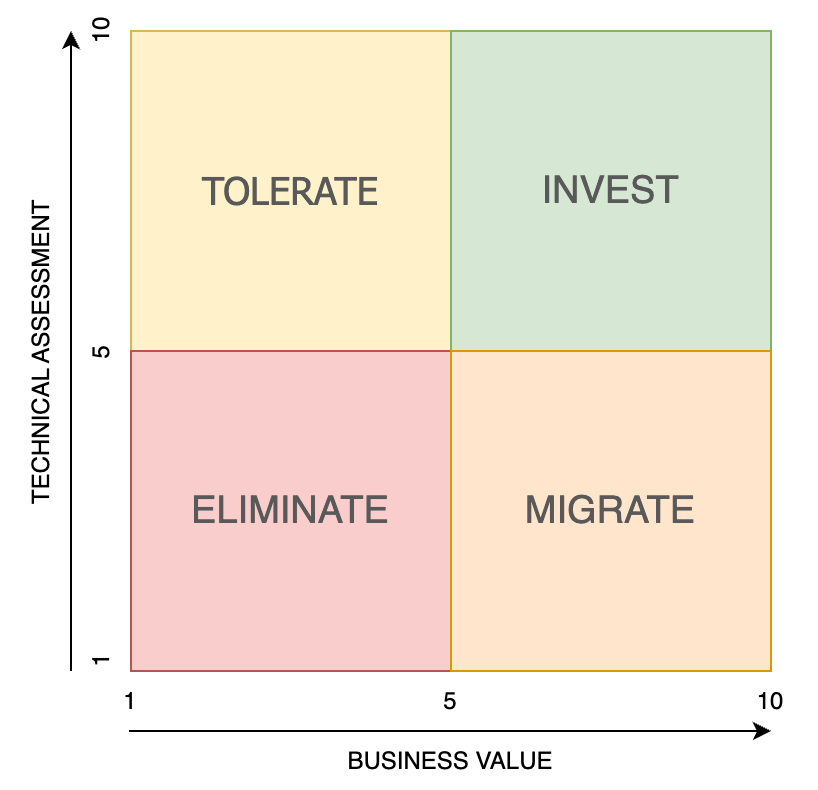
A TIME model is split into 4 quadrants:
- Tolerate
- Invest
- Eliminate
- Migrate
Understanding the Quadrants
Tolerate
The top left quadrant of the model indicates a solution that is of high quality but may not be driving business value. This could be for several reasons. We could consider that the application may not be needed by the business, in which case it could be dismissed. However, the business value and return on investment may not yet be realised even though technically it is a good fit, so we do nothing.
A newer application with rich functionality not yet fully integrated into the operations of the business may appear here and move to the invest segment at a later date.
Another viewpoint is that these applications are providing some business value with very low impact on the technology team and at a low cost. In this case we keep them running and tolerate their presence as an edge solution. We don’t spend any time or effort to improve upon them or cut them off. They are not the first point of call when looking at the roadmap.
Invest
Solutions that sit in the top right hand-side of the model are those that are performing well, are cost effective and critical to the success of the business. The word invest would lead most to suggest that we would look to spend more money on them, but this is not necessarily the case.
These solutions should be nurtured, supported, and evangelised as doing a good job within the stack. There is no immediate need to improve upon them, but they should be considered for the ongoing roadmap as for now they are not going anywhere. These applications will normally fall into the migrate quadrant over time as the business evolves and the solution does not follow suit.
Migrate
A solution that sits in the migrate quadrant is identified as holding great business value but has fallen behind in its ability to service the business going forward due to its technical capabilities. It has also now become a burden on the IT department as it is not performant, difficult to support and has no extensibility to ensure it can service the growing needs of the organisation.
A case in point would be a legacy ERP system. Whereas it served the business greatly in the past it was tailored towards an SME sized organisation with basic business processes. As that business began to grow so did the volume and complexity of its data points. It became more complex in its operations. With this in mind migrating to a larger scale solution makes sense as the “Technical Fit” of the application has fallen to a degree that it is affecting the business’ ability to grow.
Eliminate
What do we do when there is no need for a solution, we remove it. Has the addition of this application become a burden on the business and IT application, the pain far outweighs the benefit? This would be a candidate for removal. Low business value and low Technical fit indicate an application that should be removed from the stack.
Other reasons why an application would be removed, it has a very limited user base and falls in this bucket where other suitable applications exist in the stack. Consider video conferencing technology; during the COVID pandemic, organisations try to utilise a single solution such as Microsoft Teams. One senior person in the business is using WebEx as they prefer it, and a license was purchased. Why would we support an application that only has one user?
Lastly a product that had previously fallen into the ‘migrate’ sector will inevitably move to the eliminate if it was still within the stack, had been replaced and is now good to be earmarked for dismissal.
Evaluating Where an Application Sits
Applications are mapped based on a business value and technology fit.
These are managed with a top-level scoring but I have broken them down into a number of different sub categories with weighting. These can be application specific if required and the below is only a suggested approach to score.
Business Value
- Use Case: Does it solve a business need?
- Enabler: What operational efficiencies does it enable?
- Criticality: Is this function critical?
- Usability: How easy is it for the business to use? Is it intuitive, well designed, modern?
- Cost/Return: Do we save money by having this solution in place?
Technology Fit
- Supportability: How easy is it to support?
- Accuracy: Is it doing what it needs to do accurately?
- Security & Resiliency: Is it robust and secure?
- Future Proof: Is it scalable & extensible.
- Technology: Does it utilise modern technology and follow the principles we have as an organisation?
The Model in Action
See below an example of a mapping exercise, consider that this could be an average score taken from multiple users. However, be wary of introducing bias by asking the wrong questions to certain groups. An idea would be to split the questions so that the scorings are provided by those who can best provide the insight.
Marks provided for each category should be weighted to 100% and the total score summed to evaluate where the application falls on the model.
Example: a Legacy Point of Sale Solution
| Business Value | Comment | Mark 1-10 | Weight | Score |
|---|---|---|---|---|
| Use Case | Requirement to transact with our our customer in store | 8 | 20% | 1.6 |
| Enabler | Limited Omnichannel capability but manages direct sales well | 6 | 20% | 1.2 |
| Criticality | We would not be able to transact without it | 9 | 30% | 2.7 |
| Usability | Not particularly modern but easy to use and standard function for a POS | 7 | 15% | 1.05 |
| Cost/Return | Relatively cheap although the hosting is quite high now | 6 | 15% | 0.9 |
| 7.65 |
| Technology Fit | Comment | Mark 1-10 | Weight | Score |
|---|---|---|---|---|
| Supportability | Generally easy to support as a legacy product it is well known | 8 | 20% | 1.6 |
| Accuracy | Limited issues with Data Accuracy and ability to trade, no trickle feed. | 7 | 15% | 1.05 |
| Security & Resiliency | Poor resiliency, compromised data architecture and not performant | 3 | 30% | 0.9 |
| Future Proof | No Omnichannel or MPOS capability | 2 | 20% | 0.4 |
| Technology | Legacy product reliant on self hosted stack, older hardware & means of integration (CSV). | 3 | 15% | 0.45 |
| 4.4 |
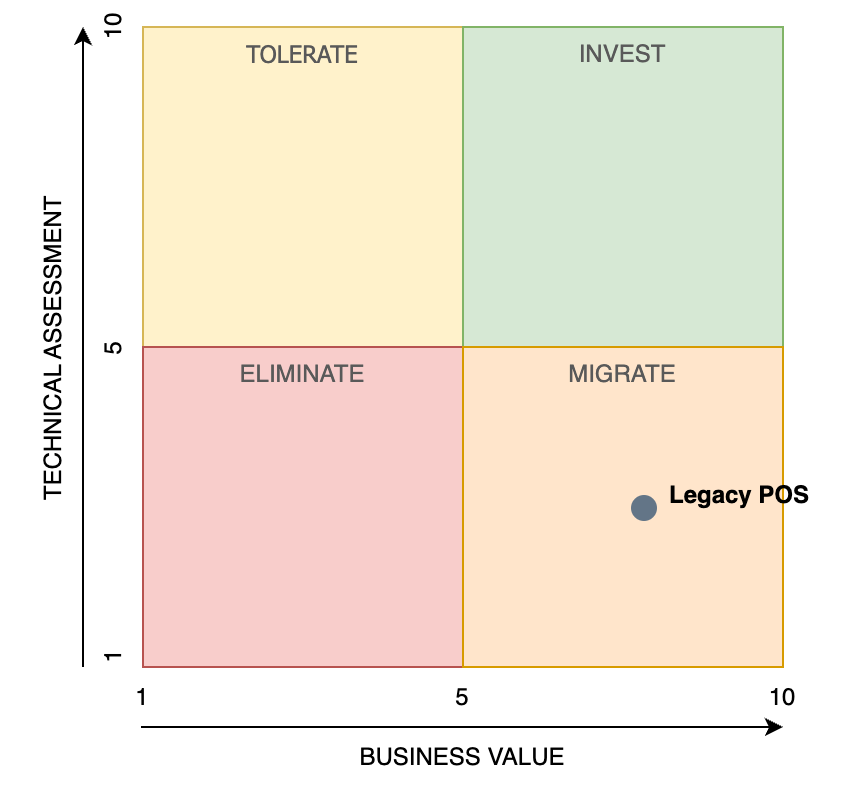
After considering rounding this would put the POS system at a Business Value of 8 and a Technology Fit of 4 (We round the total to the nearest whole number opposed to ceiling or flooring).
The outcome of this quick assessment tells us a number of things about the application;
It provides very good business value considering we need a POS system to transact in our stores and it’s a critical system, however from an IT perspective it is not delivering.
We look mainly towards the lower scores. We know it is not resilient, due to issues around the database indexing, we can not have a trickle feed to the ERP so a centralised live view of stock is not possible.
In regards to it being future proof, it has limited out of the box omnichannel capability and would need substantial development to fill that gap. The business has a technology principle of “Configuration over Code” so cannot entertain the idea of extending the life of a legacy product by bespoke development.
Finally it uses legacy means of communication such as flat files for integration and an older non scalable stack whereas a modern application would look towards scalable SSAS hosting and API based connectivity. This also goes against their technology principles of being “Cloud First” & “Mobile First”.
Given it’s scoring our example POS system falls into the “Migrate” quadrant of the model with a high “Business Value” of 8 and low “Technical Fit” of 4. We have recognised that the POS, being a core application in the business is 100% required and has a lot of value as a solution but given it’s supportability and features, we must look to move to a different provider.
Continued Evaluation
The generation of a TIME analysis as a one-off activity has a lot of benefits. It can give insight to stakeholders before embarking on a large transformation for instance.
However, I would advise that this activity is carried out at least annually and presented as part of an architectural review. It allows the analysis to be presented as part of a progressive journey where the adoption, upgrade or retirement of solutions can be shown and the rationale behind the choices clearly recorded.


 Simon Suarez
Leave a comment